Issues
Testspace works with your issue tracker: Jira, GitHub, GitLab or Bitbucket, or any other tracker by URL. From a failing test case, automated or Manual, you can link an existing issue or create a new one, and Testspace keeps the issue with the failure while it's tracked and shows whether the issue is open or closed.
How It Works
- Link or create. In Triage, or in a Manual test session (Running Tests), paste an issue's URL to link it; with a connected tracker you can type just its key (
PROJ-42,#42). Push new issue creates one in your tracker instead. - The issue links back. A pushed issue's description names the Suite and case, linked to the Result in Testspace, with the case's status, who ran it, in which Result, and your notes. For a Manual spec in a GitHub or GitLab repository, it includes the test's instructions.
- It stays with the failure. An issue linked to a tracked failure stays with it in every later Result until the failure is resolved or retired (How Tracking Works).
- Comment instead of a duplicate. When the case fails again, Add Comment to posts the new run to the issue already linked.
- Status is followed. Testspace shows whether each issue is open or closed, updated by the tracker's webhook. The Issues tab flags an issue Closed, still failing, and one whose cases now pass.
Creating issues, commenting and following status need a connected tracker. With Generic, for any other tracker, Testspace stores the references you paste. Sandbox Spaces never create issues. Issue Providers compares what each tracker supports.
Set Up
- Connect the tracker to your Organization, once: Jira, GitHub, GitLab or Bitbucket in Integrations.
- Choose the Project's tracker: a Standalone Project's Issues provider setting (Standalone Projects); a Connected Project uses its repository's issues unless
.testspace.ymlnames another, such as a Jira project (Connected Projects). - Link or push issues from Triage on the Space's active Result, or while running a Manual spec.
The Tutorial walks through linking an issue by URL.
Where Issues Show
- the Result's Issues tab (below)
- the Space's Issues graph, open and closed issues over time (Metrics)
- the N issues count in the Spaces listing and the Results list
- the Issues column on the Manual tab, e.g. 1 open
Issues Tab
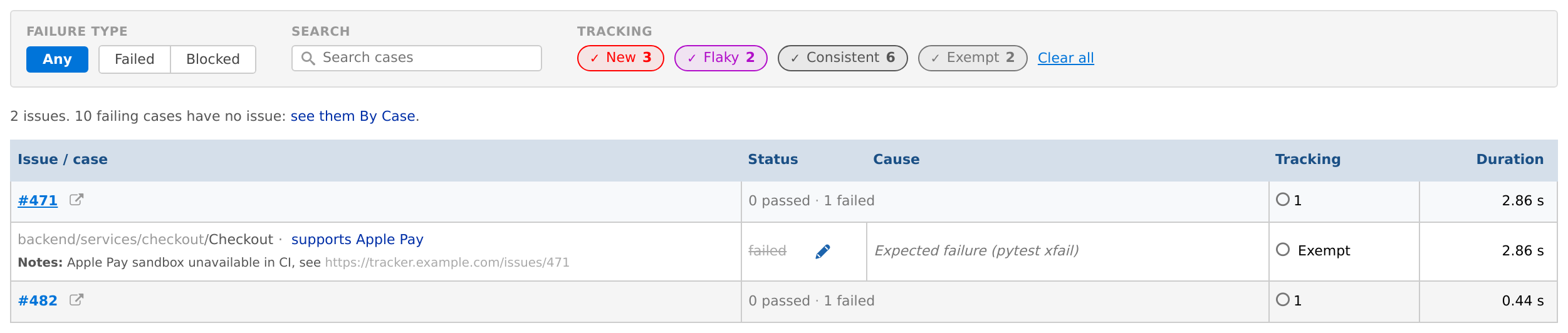
The Issues tab appears when a Result's tracked failures reference issues, from Triage or from a Manual tester's Issues field. It has the Failures filters, except Organize by, and one row per issue:
- the issue's key, a link to it in the tracker, its title, and, for a connected issue provider, whether it is open or closed
- its cases' counts, tracking and duration
- a note when it applies: Closed, still failing, All N cases now pass, or Referenced by N cases (an issue from a tester's Issues field with no tracked failure)
Click an issue's key to expand its cases, shown as in By Case. A line above the table counts the issues and the failing cases with no issue, with a link to them By Case.